Robotic Arms Under $10,000 for Research Labs: Price, SDK & Fit
Source: https://sourcebotics.com/guides/robotic-arms-under-10000-research-labs/
TL;DRCompare PiPER, NERO and other research-arm options using documented payload, reach and software support, then budget for the complete integration.
Three arms with public price references
| Model | Manufacturer price displayed | Published size and payload | Reason to shortlist |
|---|---|---|---|
| myCobot 280 M5Stack 2023 | $649 USD | Six axes; 280 mm working radius; 250 g payload | Teaching and small-object work where this workspace and load are sufficient |
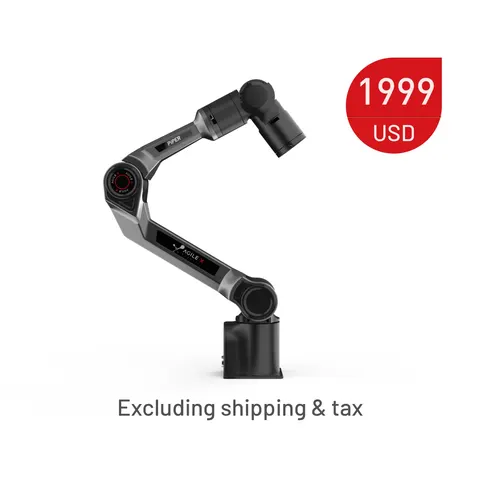
| AgileX PiPER | $1,999 USD | Six axes; 626 mm reach; 1.5 kg payload | Bench manipulation and data-collection projects needing a larger workspace |
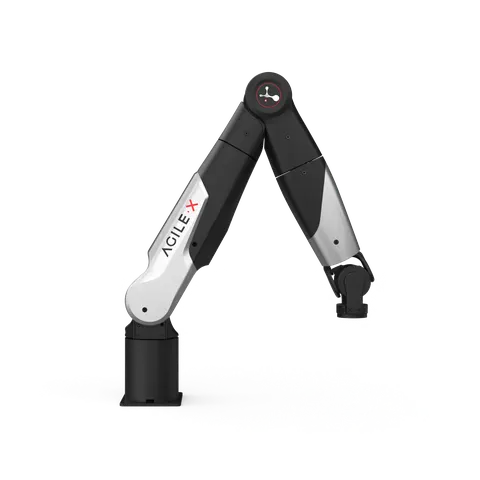
| AgileX NERO | $2,499 USD | Seven axes; 580 mm reach; 3 kg payload | Projects that can use an additional arm joint and more tool payload |
Prices and figures were reviewed on 2026-09-15 in the Elephant Robotics store, AgileX PiPER listing and AgileX NERO listing. They are manufacturer-published references, not Sourcebotics offers or confirmation of stock. Check the selected package, currency, accessories, taxes and shipping with the seller.
The distinction between PiPER and NERO is not simply “more expensive is better.” Their reach and joint layouts differ. Draw the target poses, tool orientations and obstacles, then ask the supplier to confirm that the arm can execute the required trajectory with the proposed tool.
What the software references actually tell you
| Platform | Public development resource | Check before committing |
|---|---|---|
| myCobot 280 M5 | Manufacturer documentation | Controller version, host connection, supported API and examples for that version |
| PiPER | Official piper_sdk repository | Firmware compatibility, CAN adapter and the command modes required by your experiment |
| NERO | Official pyAgxArm repository | The NERO-specific setup, firmware, interface and supported operations |
The PiPER SDK documentation includes a CAN setup procedure with adapter-specific assumptions. Do not treat “CAN support” as a promise that every USB adapter works with the supplied scripts. Ask the seller to identify the tested host interface and firmware combination.
A repository's existence does not prove that it builds on your lab's computers or exposes every controller layer. We reviewed these references; we have not built or tested them against physical arms. For ROS 2, record the exact distribution, driver repository, branch or release, and any supported planning package.
Match access to the experiment. Motion planning may need a reliable position-command interface. Torque-control research needs the relevant low-level modes, feedback and timing. Neither requirement should be replaced by a generic “open SDK” check box.
Check tool payload and usable workspace
List the gripper, camera, adapter and handled object as a complete wrist assembly. Their masses count toward the load, and their centers of gravity affect the moment at the flange. Ask for allowable loads at the intended poses and speeds, rather than subtracting masses and assuming every pose is acceptable.
Reach is also not the same as usable workspace. A target point may be reachable with the wrong tool orientation or only near a joint limit. Provide a sketch with the table, objects, camera, fixture and desired approach direction. Include cable clearance and how the setup resets after a failed grasp.
PiPER and NERO pages report 0.1 mm repeatability. That does not establish absolute Cartesian accuracy or measured performance in your installation. Ask for the test definition and verify the criterion that your experiment needs. Do not infer that a less expensive arm has no published precision information without checking its current documentation.
Keep the full setup inside the budget
| Budget line | What belongs in the quotation |
|---|---|
| Arm and controller | Exact revision, power supply, controller, standard cables and included accessories |
| End effector | Gripper or hand, interface, mounting plate, fingers or pads |
| Perception | Cameras, lighting, calibration targets and mounts |
| Workstation | Host computer, adapters and any required compute upgrade |
| Installation | Base, fixture, cable routing and provisions required by the risk assessment |
| Software work | Drivers, calibration, demonstrations, integration and acceptance deliverables |
| Delivery and service | Destination, freight, import-cost responsibility, repair terms and proposed spares |
Do not assume that every item pictured on a product page is included. A $10,000 budget might cover several teaching stations or one more complete manipulation setup; the right allocation depends on the experiment and the actual quotations.
A small payload does not make a robot harmless, and “collaborative” in a product name does not establish that your assembled application is suitable for unguarded operation. Have the lab define operating procedures and assess the complete system, including its tool and fixtures.
Request an acceptance example before a larger order
Specify a reproducible example in the purchase requirements: identify the device and firmware, read feedback, execute a documented movement within agreed limits, collect the required observations and stop through the supported procedure. Have the supplier propose the setup and evidence needed for your test.
For data collection, add synchronized camera and action logs, a sample file and a description of the control mode. For an existing project, give the supplier your actual software versions. For a spare-parts plan, ask which parts are field replaceable and what calibration is required after replacement.
Use the research robot procurement checklist to capture the complete scope. For finger selection, see the dexterous-hand comparison. If your research genuinely requires walking, compare the G1 development-platform options separately.
Request a research-arm shortlist with your object weight, complete tool mass, workspace sketch, required control modes and destination.
Sources and review scope
The manufacturer stores, product pages and software references linked above were reviewed on 2026-09-15. Prices are public listing snapshots; specifications are manufacturer-reported. This guide does not report physical tests, verified driver builds, certification status or guaranteed delivery dates.
FAQ
Are these complete systems for less than $10,000?
The reviewed manufacturer prices are below that threshold, but a complete system needs an itemized quotation including tooling, software work and delivery.
Is NERO a direct replacement for PiPER?
Do not assume so. Their joint layouts and workspaces differ; verify mounting, tool interface, control modes and software compatibility for the project.
Do I need seven axes?
Only if the additional motion helps with the required poses, obstacle avoidance or experiment. Ask for a trajectory review rather than selecting on joint count alone.
Does ROS support include torque control?
No such implication follows from the label. Confirm the actual driver and command modes for the delivered hardware and firmware.
Planning a robotics purchase? Share the quantity, configuration and destination so we can check fit, availability and quote requirements.
Request a quote— The Sourcebotics sourcing desk
Products to investigate
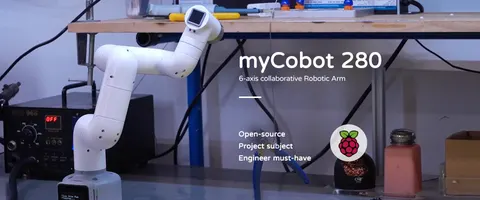
- Degrees of freedom
- 6
- Payload
- 250 g
- Working radius
- 280 mm